|

LionClock
Pro 2011 for Networks
| Download and try LionClock Pro in action!
The Demo version can manage up to 3 employees and is limited to
2 workstations. The Full version can manage up to 200 employees
and is available in different configurations including 5, 10, 15
or more workstations. You can instantly turn your installation
into a Full Version by
purchasing a license key online. LionClock Pro
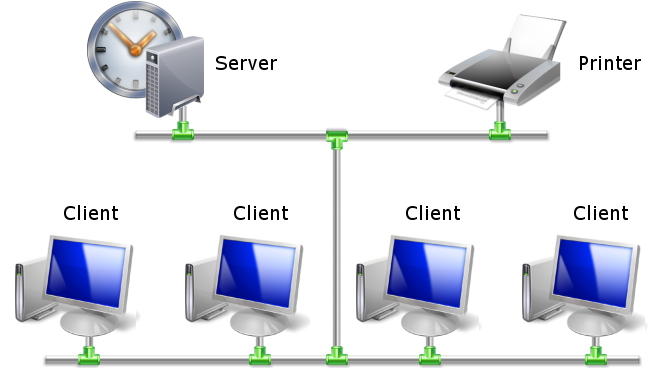
has two parts: |
LionClock Pro has revolutionized the way by which I do
my business, it has streamlined staff tracking and pay
operations to such an extent that I have downsized my
admin numbers. Recommend to all to at least give it a
try.
Electroversal Australia |
|
| LionClock
Server |
LionClock
Client |
| Used by the administrator to
manage employees, edit time entries, view, create and print payroll
reports |
Used by employees to clock IN
and OUT |
| Must be installed on a computer
accessible by the administrator only |
Can be installed on different
computers in the company to allow employees to clock IN and OUT from
different workstations* |
| Keeps all the employee
information, their time files and passwords |
Optionally, allows employees to see their working hours |
On Windows 2000/2003/XP/Vista/Win7 can run as
a service (invisible background application)
Note: if using Windows Terminal
Services, Citrix Server or Terminal Server, use the
standalone, non-networked edition
instead. |
Doesn't keep any employee
information |
| Easily exports employee time
entries directly to QuickBooks (read
more) |
|
|
|
|
LionClock Pro is compatible with
standard TCP/IP based networks. It runs on Windows 2000, XP, 2003, 2008,
Windows Vista and Windows 7. To
install the Demo version of LionClock Pro simply download the
Server and Client setup files below. Then follow the
installation instructions.
When you purchase a full version of LionClock
Pro, you simply enter your license key into LionClock Server to
immediately unlock the full version.
The LionClock Client has no limitations.
* Note:
If using Windows Terminal Services, Citrix Server or Terminal Server,
use the standalone, non-networked
edition. |