Our software has a new name: LionClock. Our web site has moved to a new address, click here to bookmark it

Login to Customer Download Area
 Username
 Password    Log-in
 Lost Password? Click Here!

     Home

  LionClock & LionClock Pro
     Product Info
     LionClock
     LionClock Pro
     Screenshots
     QuickBooks Integration

     Download
     Buy Now
     Upgrade

  LionClock Premium
     Product Info
     Mobile Web Interface

  LionClock for iPhone
     Time & Billing for iPhone
     Version History
     FAQ & Support

  Support
     Questions & Answers
     Support


  Upcoming Products    
     Biometric LionClock

  Our Customers
     Some of our Clients
     Client Testimonials
     Full Client List

  LionClock Accessories
     ID Cards for LionClock
     Magnetic ID Cards
     Magnetic Card Readers
     Order Now

  Company
     Contact Us
     News and Blog
     Reseller Resources 


QuickBooks Integration
Easily synchronize your LionClock
ä employee time entries with QuickBooksâ

More than 3.7 million small businesses use QuickBooks as their accounting software. If your company uses QuickBooks as well, you would be interested to find out that LionClock offers seamless QuickBooks synchronization of employee time entries with just a few mouse clicks.

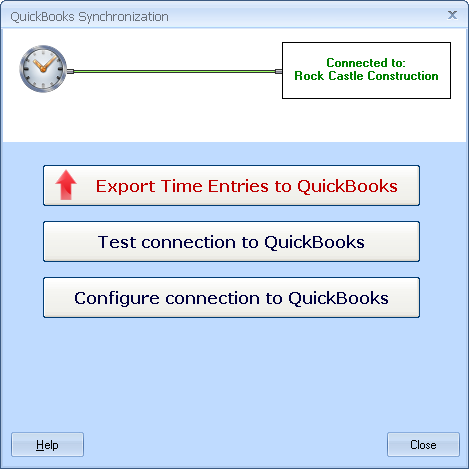
QuickBooks synchronization is available by default in all editions of LionClock 3.xx via the "Manage - QuickBooks Synchronization" menu.

QuickBooks integration allows you to:

time clock for quickbooks, timer replacement
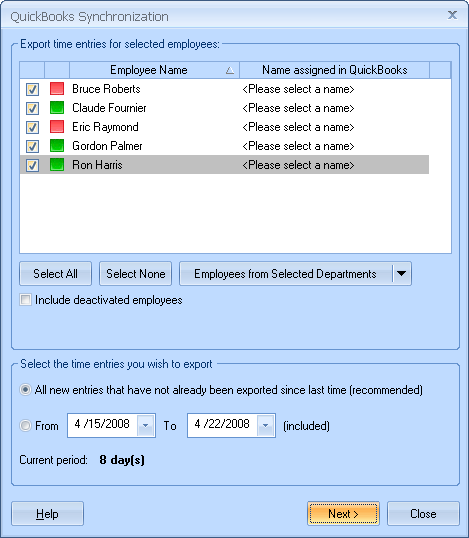
Quickly transfer all (or specific) employee time entries recorded by LionClock to your QuickBooks company file. You could then do payroll and print pay checks from within QuickBooks.
Transfer all employee info from QuickBooks to LionClock automatically. This timesaving feature is especially useful the first time you install LionClock or when you add new employees. No more entering employee info manually; especially handy if your company employs a large number of people.

This feature is compatible with:

  • QuickBooks Pro (2003-2008)
  • QuickBooks Premier (2003-2008)
  • QuickBooks Enterprise (3.0-8.0)
  • QuickBooks Online Edition

If you are a licensed user of PunchClock 3.xx and you would like to take advantage of this new feature, you can download the most recent setup file of LionClock 3.xx free of charge from your Online Customer Download Area.

Read our comprehensive help file to learn more about QuickBooks synchronization or to solve common problems you may encounter

A screenshot of QuickBooks Synchronization screen: Easily export employee time entries with just a few clicks


Copyright © 2002-2008 Smart Software Development
LionClock™ is a trademark of Smart Software Development
704 4th Ave South, PO Box 871, Lethbridge, Alberta T1J 3Z8 Canada