Login to Customer Download Area
 Username
 Password    Log-in
 Lost Password? Click Here!

     Home

  LionClock & LionClock Pro
     Product Info
     LionClock
     LionClock Pro
     Screenshots
     QuickBooks Integration

     Download
     Buy Now
     Upgrade

  LionClock Premium
     Product Info
     Mobile Web Interface

  LionClock for iPhone
     Time & Billing for iPhone
     Version History
     FAQ & Support

  Support
     Questions & Answers
     Support


  Upcoming Products    
     Biometric LionClock

  Our Customers
     Some of our Clients
     Client Testimonials
     Full Client List

  LionClock Accessories
     ID Cards for LionClock
     Magnetic ID Cards
     Magnetic Card Readers
     Order Now

  Company
     Contact Us
     News and Blog
     Reseller Resources 


LionClock Pro for Networks


LionClock Pro allows your employees to punch IN and OUT from different locations in your company.

LionClock Pro Features:

prcarrow Manage up to 200 employees (ideal for small businesses)
prcarrow Manage both hourly and salaried employees
prcarrow Only the administrator can access management functions, after entering his password

prcarrow Generate payroll reports for your employees including:

bullet Regular hours/wages  
bullet Overtime hours/wages  
bullet Gross earnings  
prcarrow Save time by generating and printing all payroll reports at once
prcarrow Resizable main window with color-coded employee status
prcarrow Instantly see who is currently IN and OUT using the Status Report
prcarrow Ask for personal ID number each time an employee punches IN or OUT (no more fraud)
prcarrow Support for barcode scanners and magnetic card readers
prcarrow Add/remove employees easily
prcarrow Edit employees' time easily
prcarrow Built-in data backup/restore function
prcarrow Optional auto-break deduction: automatically deduct a break if employees forget to take it
prcarrow Automatically credit paid holidays to all or selected employees
prcarrow Supports daily or weekly overtime (or both for states like California)
prcarrow Lot's of exporting capabilities: easily export raw time entries or entire payroll reports for use with other programs

prcarrow The administrator can manage all the employees from one computer
prcarrow Allows employees to punch IN and OUT from different locations
prcarrow The employees cannot cheat since their time is recorder by the Server and all the time files are kept on the sever
prcarrow LionClock Server can run as a Windows service (a background application on Win NT/2000/XP/Vista)
   

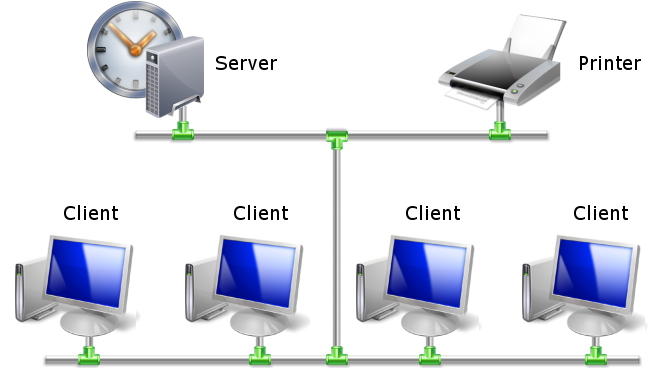
LionClock Pro has two parts:

LionClock Server LionClock Client
Used by the administrator to manage employees, create and print payroll reports Used by the employees to punch IN and OUT
Must be installed on a computer accessible by the administrator only Can be installed on different computers in the company to allow employees to punch IN and OUT from various locations
Keeps all the employee information, their time files and passwords Optionally, allows employees to see and/or print their working hours
On Windows NT/2000/XP/Vista can run as NT Service (invisible background application) Doesn't keep any employee information
Easily exports employee time entries directly to QuickBooks (read more)  

  
Punch Clock Pro for Networks Diagram


LionClock Pro is compatible with standard TCP/IP local networks. It runs on Win95/98/Me/NT/2000/XP/Vista. LionClock Pro price depends on the number of computers you would like to use it on.

Purchase LionClock Pro online starting at $ 59.99 US

Or try the Demo version for free


Copyright © 2002-2008 Smart Software Development
LionClock™ is a trademark of Smart Software Development
704 4th Ave South, PO Box 871, Lethbridge, Alberta T1J 3Z8 Canada